
What this template is for
Use it when someone asks you to look into something and come back with an answer: why costs rose, which supplier to keep, how a trial went, whether to open a second location. Owners and managers often read only the top half page. This template puts the finding and the recommendation there.
It also fits monthly or quarterly reports to partners or a board, and research written up for a customer.
- Fonts
- Source Serif 4
- Paper
- A4, one page
- Margins
- 1 in top and bottom, 1.1 in left and right
- File
- Word .docx
What is in it, section by section
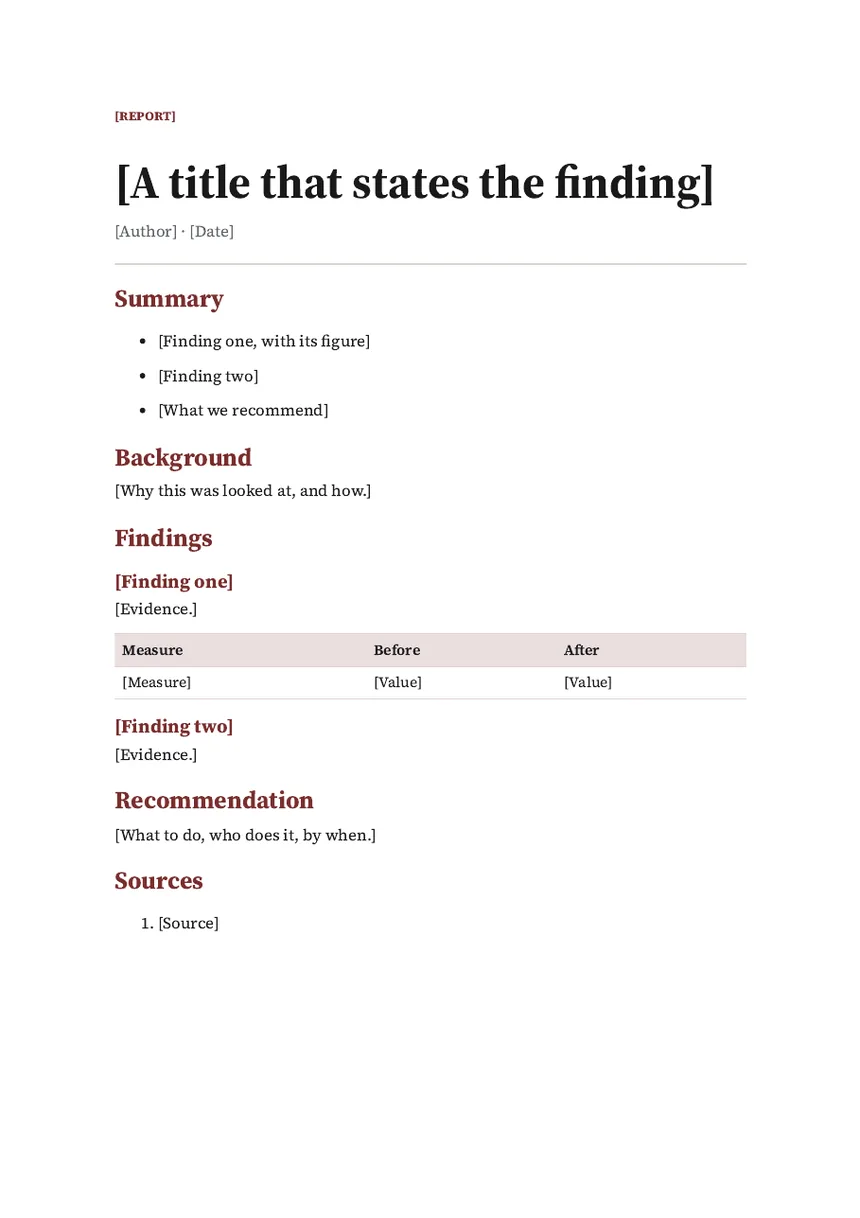
- Label, title and bylineA label such as Report or Review, a title that states the finding, then the author and date.
- SummaryThree points: the first finding with its figure, the second finding, and what you recommend.
- BackgroundWhy this was looked at, and how.
- FindingsEach finding as a heading with its evidence. A banded table shows a measure before and after.
- RecommendationWhat to do, who does it, and by when.
- SourcesA numbered list of where the evidence came from.
How to fill it in
- Write the title as a sentence, such as "Late deliveries came from one route", rather than "Delivery review".
- Fill in the findings first and write the summary last, from them.
- Give every finding its evidence: a figure, a document, or the words of someone you asked.
- Make the recommendation a decision the reader can say yes or no to.
- List your sources so anyone can check the work.
Questions
How is a report different from a memo?
A memo tells people about a decision. A report gives the evidence for one. Write the report first, and send a memo once the decision is made.
How long should a business report be?
As long as the evidence needs. The summary should stay short enough to read in a minute.
Should I add charts?
Yes, where a chart shows a change faster than a table. Put it under the finding it supports, with one line saying what it shows.
Use it in Supernatural
Supernatural: everything your business runs on, with Blue as your part-time admin. Word is one of its apps. In your workspace, you ask Blue for “a report on what we found”. Blue starts from this template, writes in what you give it, and leaves [brackets] where something is missing. Before it makes the document, Blue shows you which template it chose and what it will write. Nothing is made until you say yes.
The beta is free and asks for no card.
More free templates
Last updated 3 November 2026.